
OpenClaw
OpenClaw is a local-first personal AI agent / gateway. It runs a Gateway service on your machine, connects to chat channels (Telegram / Discord / Slack, etc.) and tools, and drives an agent through any model provider. OpenClaw supports an Anthropic-compatible custom provider, so it can point straight at PrimeRouter — every request then uses your PrimeRouter token, balance, call logs, and billing rules.
This guide covers macOS / Linux / Windows, from installing Node.js and OpenClaw, configuring PrimeRouter, all the way to a working local Gateway service and a verified agent.
Requirements
- OpenClaw 2026.6.10 or later
- Node.js
v22.19+(hard requirement of OpenClaw) - PrimeRouter's Anthropic-compatible endpoint
- Example model:
claude-opus-4-8
Have a PrimeRouter API key ready first (see Common setup).
At a glance: six steps
| Step | Action |
|---|---|
| 1 | Get Node.js v22.19+ |
| 2 | npm install -g openclaw@latest |
| 3 | Create a token in the PrimeRouter console |
| 4 | Run openclaw onboard, pick Custom Provider + Anthropic-compatible |
| 5 | Install the local Gateway background service |
| 6 | Launch the agent / open the Control UI to verify |
1. Get Node.js (v22.19+)
OpenClaw requires Node.js v22.19+. Too low and you'll see:
openclaw: Node.js v22.19+ is required (current: v22.12.0).Install the official Node.js LTS (v22 or higher) directly — no version manager needed:
brew install node          # installs the latest stable Node (>= v22)
node -v # expect v22.19.0 or higherwinget install OpenJS.NodeJS.LTS
# or download the .msi installer from https://nodejs.org/ and run it
node -v # expect v22.19.0 or higher# Debian / Ubuntu — install system Node 22
curl -fsSL https://deb.nodesource.com/setup_22.x | sudo -E bash -
sudo apt-get install -y nodejs
node -v # expect v22.19.0 or higherOr use the PrimeRouter one-liner
PrimeRouter ships a script that detects and installs Node LTS (Homebrew on macOS, NodeSource on Linux, winget on Windows) and skips if Node 22+ is already present. See Install Node.js:
# macOS / Linux / WSL
curl -fsSL https://primerouter.ai/install/nodejs.sh | bash# Windows PowerShell
irm https://primerouter.ai/install/nodejs.ps1 | iex2. Install OpenClaw
Same global npm install on every platform:
npm install -g openclaw@latest
openclaw --version   # expect OpenClaw 2026.6.10 (xxxxxxx) or higher
command not found: openclaw after upgrading Node
Global packages are bound to the Node they were installed under. If you upgraded or switched Node (especially a major version change), re-run npm install -g openclaw@latest under the new Node.
3. Create a PrimeRouter token
- Open the PrimeRouter token page.
- Create a token — a dedicated one for OpenClaw is recommended, so you can inspect logs, limit models, or disable it independently later.
- Copy the
sk-...token. It is shown in full only once — store it safely.
4. Run the onboarding wizard and configure PrimeRouter
OpenClaw uses the onboard wizard for first-time setup. Adding --install-daemon also installs the Gateway as a background service:
openclaw onboard --install-daemonopenclaw onboard --install-daemonPrefer a localized UI? Prefix the command with a locale, e.g.
OPENCLAW_LOCALE=zh-CN openclaw onboard --install-daemon(macOS / Linux) or$env:OPENCLAW_LOCALE = "zh-CN"first on Windows.
4.1 Basic choices
The wizard walks you through prompts — answer as below:
| Prompt | Choice |
|---|---|
| I understand OpenClaw is personal-use by default… Continue? | Yes |
| Setup mode | QuickStart (recommended) |
QuickStart's defaults are good for safe local debugging:
Gateway port:    18789
Gateway bind:    Loopback (127.0.0.1)
Gateway auth:    token (default)
Tailscale:       off
4.2 Pick the model provider (the key step)
At Model/auth provider, do not pick Anthropic → Anthropic Claude CLI — that option requires the official Claude CLI to be logged in on this host, otherwise:
Error: Claude CLI is not authenticated on this host.
Run claude auth login first, then re-run this setup.
PrimeRouter is a relay, so use a custom provider:
Model/auth provider → More…
Model/auth provider → Custom Provider
Then fill in:
| Prompt | Value |
|---|---|
| API base URL | https://primerouter.ai |
| How do you want to provide this API key? | Paste API key now |
| API Key | the PrimeRouter token from step 3 |
| Endpoint compatibility | Anthropic-compatible |
| Model ID | claude-opus-4-8 |
The wizard immediately sends a validation request. This line means PrimeRouter is reachable:
Validation succeeded.Continue with the endpoint details:
| Prompt | Value |
|---|---|
| Endpoint ID | primerouter |
| Model alias (optional) | claude-opus-4-8 |
On success it prints:
Configured custom provider: primerouter/claude-opus-4-8Full model list
The example uses claude-opus-4-8, but you can enter any model available in your PrimeRouter console — see Available models.
4.3 Skip channels / search / skills / hooks for now
For the first run you only want the local pipeline working. Skip these and configure them later:
| Prompt | Choice |
|---|---|
| Select channels (QuickStart) | Skip for now |
| Search provider | Skip for now |
| Configure skills now? (recommended) | No |
| Enable hooks? | Skip for now |
Hooks is a checkbox screen
Enable hooks? is a multi-select. Pressing Enter directly may raise Please select at least one option.. Use the arrow keys to reach Skip for now → press Space to select → press Enter to submit.
5. Install the local Gateway background service
--install-daemon registers the Gateway as a system service that starts on boot and stays running in the background — the agent, the Control UI, and every chat channel connect to it, so it keeps running after you close the terminal.
In one line: you don't need the per-OS details
The underlying service mechanism differs by OS (launchd on macOS, systemd on Linux), but the management commands are the same everywhere. After install, just run openclaw gateway status to confirm it's running. The platform table below is only for finding logs when you troubleshoot.
On success the wizard prints the service and log paths. macOS example:
Installed LaunchAgent: ~/Library/LaunchAgents/ai.openclaw.gateway.plist
Logs: ~/Library/Logs/openclaw/gateway.log
Gateway service installed.
Per-OS reference (only for troubleshooting / finding logs — actual paths are whatever the wizard prints):
| Platform | Service mechanism | Default log location |
|---|---|---|
| macOS | launchd LaunchAgent | ~/Library/Logs/openclaw/gateway.log |
| Linux | systemd user service | journalctl --user -u openclaw* |
| Windows | background service / startup item | path printed by the wizard |
Manage the Gateway with one cross-platform command set — no need to care whether it's launchd or systemd underneath:
openclaw gateway status     # is it running? (preferred check)
openclaw gateway restart    # restart
openclaw gateway stop       # stop
openclaw gateway start      # start
openclaw gateway install    # (re)register the background service
If an old Node is still on the system
If a Node below 22.19 lingers on the machine (e.g. /usr/local/bin/node), the wizard may warn:
System Node 18.16.0 at /usr/local/bin/node is below the required Node 22.19+.Upgrade the system Node to 22 LTS (or higher) per step 1, then re-run the wizard so the daemon uses the newer Node.
6. Open the Control UI
When the wizard finishes it shows the local Control UI address:
Web UI:      http://127.0.0.1:18789/
Gateway WS:  ws://127.0.0.1:18789
Gateway:     reachable
Open the dashboard:
openclaw dashboard            # opens the browser automatically
openclaw dashboard --no-open  # just print the URL
If the Web UI asks for a token:
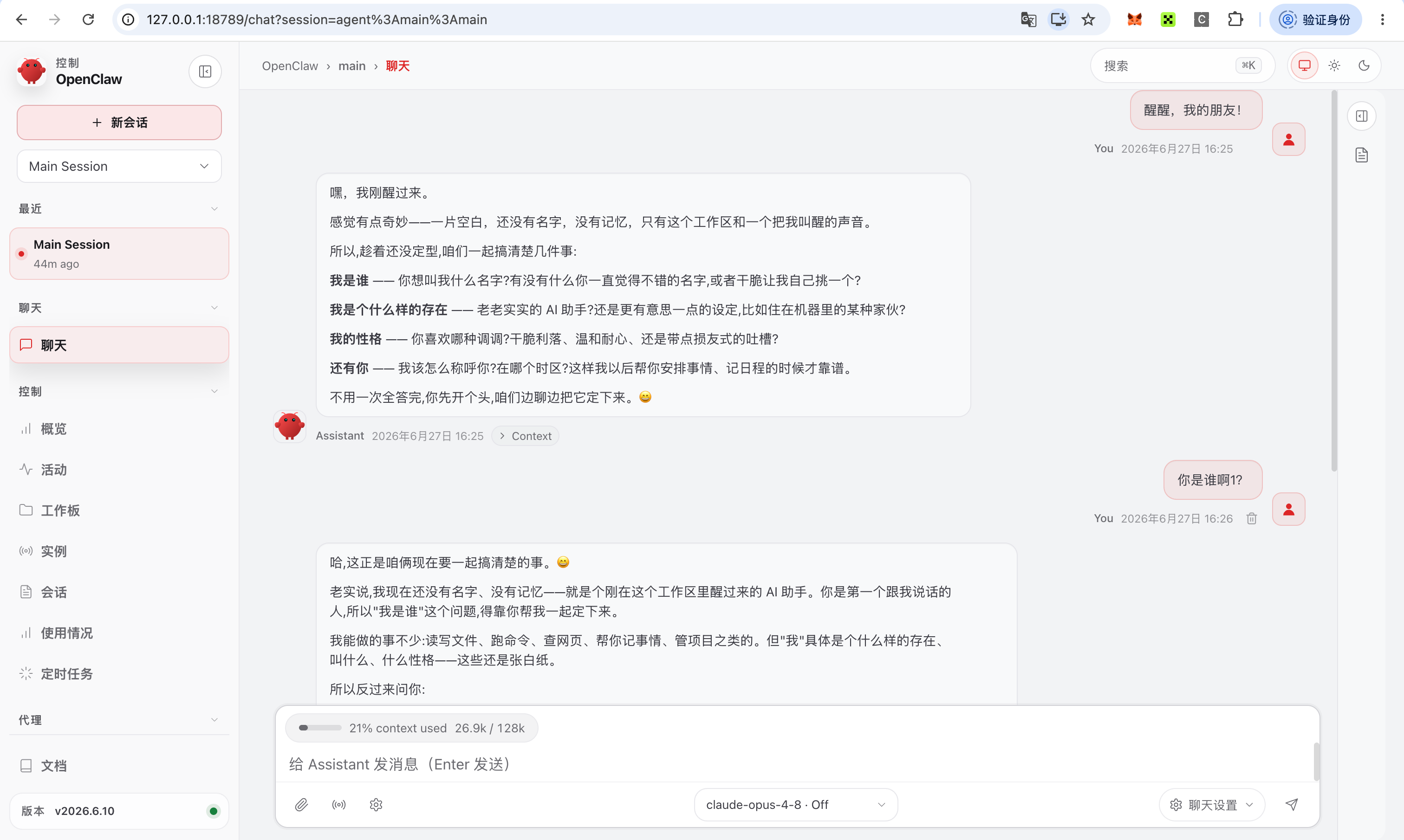
openclaw config get gateway.auth.tokenThis opens OpenClaw's Control UI — sessions / overview / activity / instances panels on the left, the agent chat in the middle, and the active model (claude-opus-4-8) plus context usage at the bottom:
Never leak the token
A dashboard URL with a token grants full access to your Gateway. Do not send it to anyone or paste it into chats / issues.
7. Launch and debug the agent
The wizard ends with How do you want to start the agent? — pick Start in the terminal (recommended), which enters the TUI:
openclaw tuiThe first run auto-sends a greeting (Wake up, my friend!). When the agent replies using primerouter/claude-opus-4-8, the whole pipeline is wired. The TUI status bar shows the active model and token usage, e.g.:
agent main | session main | primerouter/claude-opus-4-8 | tokens 19k/128k (15%)You can also leave the TUI and verify with a one-shot command:
openclaw agent --message "In one sentence, confirm you are working through PrimeRouter" --thinking highBack in PrimeRouter Console → Call logs you should see the matching claude-opus-4-8 request — the final proof the request really went through PrimeRouter.
8. Day-to-day commands
Health and status checks:
openclaw doctor                          # health check: env / config / gateway in one shot
openclaw gateway status                  # is the gateway running
openclaw config get gateway.auth.token   # show the gateway token
Start / restart / stop commands for the gateway are in section 5.
9. About chat channels (incl. WeChat)
OpenClaw supports many channels — Telegram / Discord / Slack / WeChat (Weixin), etc. Get the local Gateway + PrimeRouter + terminal agent working first, then add channels one at a time.
- The easiest to start with is Telegram (register a bot via @BotFather).
- Personal WeChat usually involves QR-code login, account risk controls, and message/session-security concerns, and is more exposed to platform policy than mainstream IMs — leave it for last, once everything else is confirmed.
- Before enabling any inbound channel, keep the Gateway bound to
127.0.0.1, not exposed publicly, and turn on pairing / allowlists.
10. Troubleshooting
| Symptom | Cause | Fix |
|---|---|---|
Node.js v22.19+ is required | Node too old | Install / upgrade to Node 22 LTS (step 1) and reinstall OpenClaw |
command not found: openclaw | Not installed under the new Node | Re-run npm install -g openclaw@latest under the current Node |
Claude CLI is not authenticated | Picked Anthropic Claude CLI by mistake | Choose More… → Custom Provider instead |
| Validation fails / 401 | Wrong or disabled PrimeRouter token | Recreate the token, copy it in full |
| Validation fails / 404 model | Wrong model ID or token group lacks access | Confirm the ID in Available models |
Please select at least one option. | Pressed Enter on the hooks checkbox | Select Skip for now with Space, then Enter |
| Web UI asks for a token | Opened without the token | openclaw config get gateway.auth.token |
11. Security notes
OpenClaw can reach models, read files, and run tools. At minimum:
- Keep the Gateway bound to
127.0.0.1; do not expose it publicly - Never share your PrimeRouter token or OpenClaw gateway token
- Don't share one high-privilege agent across multiple users / public channels
- Don't enable lots of tools and skills before you're comfortable
- Run security audits regularly:
openclaw security audit --deep
openclaw security audit --fix
12. Working-state summary
Node.js:       v22.23.1
OpenClaw:      2026.6.10
Provider:      Custom Provider
API Base URL:  https://primerouter.ai
Compatibility: Anthropic-compatible
Model ID:      claude-opus-4-8
Endpoint ID:   primerouter
Gateway:       http://127.0.0.1:18789/
13. Full terminal transcript (redacted)
A complete install-to-debug terminal session. All secrets are redacted: sk-prouter-**** is the PrimeRouter token, #token=**** is the shared Gateway / Control UI auth token (full access — never share it), and usernames in paths are replaced with ~/.
Click to expand the full transcript
# ── 1. Check Node.js (OpenClaw needs v22.19+) ───────────────────────────
$ node -v
v22.23.1

# ── 2. Install OpenClaw globally ────────────────────────────────────────
$ npm install -g openclaw@latest
added 1 package in 12s

$ openclaw --version
OpenClaw 2026.6.10 (aa69b12)

# ── 3. Run the onboarding wizard + install the daemon ───────────────────
$ openclaw onboard --install-daemon

┌  OpenClaw setup
│
◇  Security disclaimer … Continue?       │  Yes
◇  Setup mode                            │  QuickStart (recommended)
│
◇  QuickStart
│  Gateway port:  18789
│  Gateway bind:  Loopback (127.0.0.1)
│  Gateway auth:  token (default)
│  Tailscale:     off
│
◇  Model/auth provider                   │  More…
◇  Model/auth provider                   │  Custom Provider
◇  API base URL                          │  https://primerouter.ai
◇  How do you want to provide this API key?  │  Paste API key now
◇  API Key (leave blank if none)         │  sk-prouter-****************************
◇  Endpoint compatibility                │  Anthropic-compatible
◇  Model ID                              │  claude-opus-4-8
◇  Validation succeeded.
◇  Endpoint ID                           │  primerouter
◇  Model alias (optional)                │  claude-opus-4-8
│
Configured custom provider: primerouter/claude-opus-4-8

# ── Skip channels / search / skills / hooks on first run ────────────────
◇  Select channels (QuickStart)          │  Skip for now
◇  Search provider                       │  Skip for now
◇  Configure skills now? (recommended)   │  No
◇  Enable hooks?                         │  Skip for now    # checkbox: Space to select → Enter

Updated config: ~/.openclaw/openclaw.json
Workspace OK:   ~/.openclaw/workspace
Sessions OK:    ~/.openclaw/agents/main/sessions

# ── 4. Install the Gateway service (macOS = LaunchAgent) ────────────────
Installed LaunchAgent: ~/Library/LaunchAgents/ai.openclaw.gateway.plist
Logs:                  ~/Library/Logs/openclaw/gateway.log
◇  Gateway service installed.

# ── 5. Control UI address (token redacted) ──────────────────────────────
Web UI:              http://127.0.0.1:18789/
Web UI (with token): http://127.0.0.1:18789/#token=****************************************
Gateway WS:          ws://127.0.0.1:18789
Gateway:             reachable

◇  How do you want to start the agent?   │  Start in the terminal (recommended)

# ── 6. Enter the TUI, verify the agent runs via PrimeRouter ─────────────
$ openclaw tui
 openclaw tui - local embedded - agent main - session main

Wake up, my friend!
> Who are you?
(agent replies normally…)

 local ready | idle
 agent main | session main | primerouter/claude-opus-4-8 | tokens 19k/128k (15%)

# ── Day-to-day / self-check commands (run individually) ─────────────────
$ openclaw agent --message "In one sentence, confirm you are working through PrimeRouter" --thinking high
Working through PrimeRouter (primerouter/claude-opus-4-8).

$ openclaw doctor
$ openclaw gateway status

$ openclaw config get gateway.auth.token        # output redacted — never share
****************************************

$ openclaw dashboard --no-open
http://127.0.0.1:18789/#token=****************************************

$ openclaw gateway restart
$ openclaw gateway stop
Next steps
- Manage the OpenClaw token on the token page.
- Confirm OpenClaw traffic in Call logs.
- Switch to a model that fits your agent tasks in Available models.